
When Your Company Is Nine Companies: Who Owns the Customer Record?
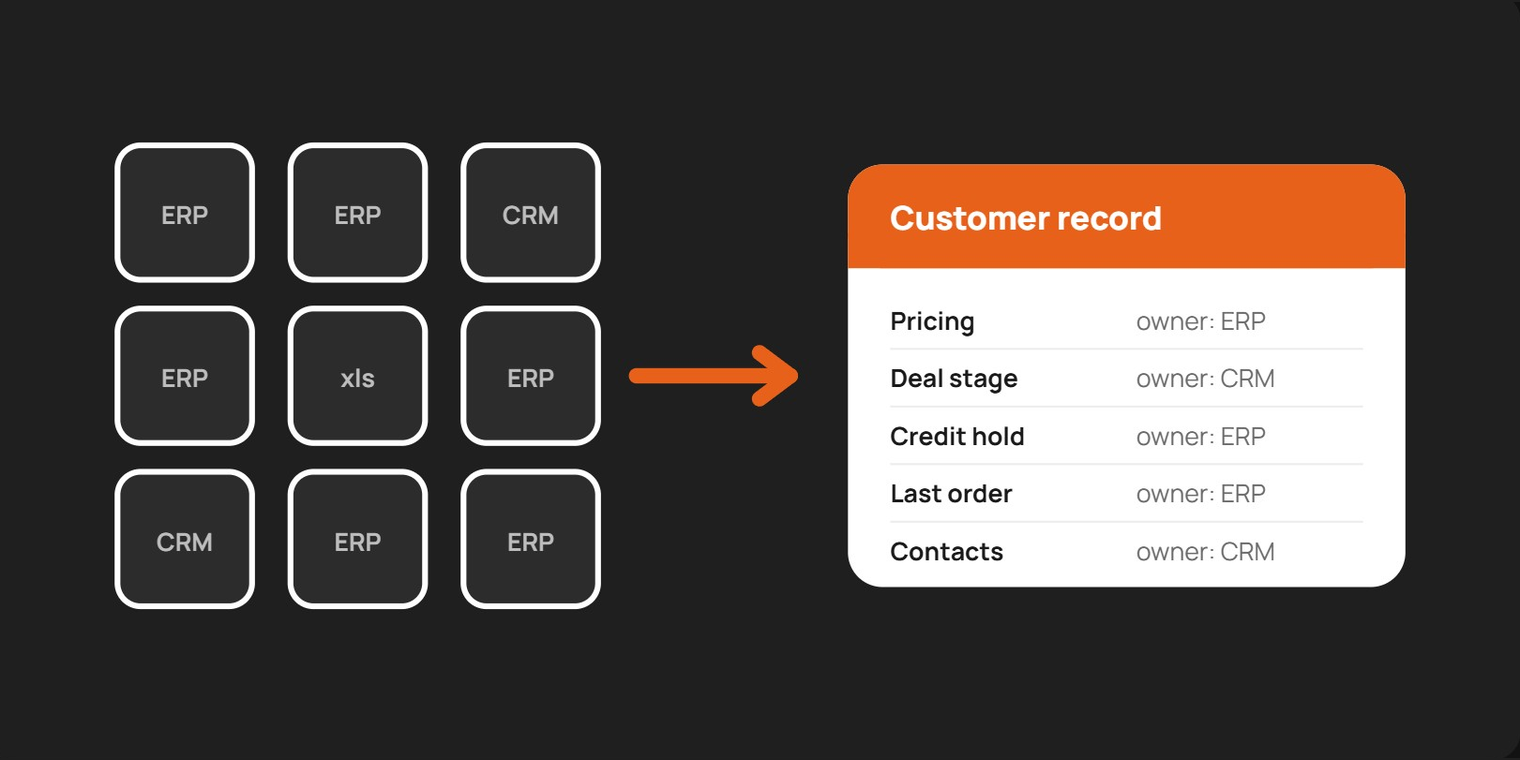
Short answer: when a group runs several ERPs and one CRM, no single system should own the whole customer record. Each field needs one owner. In most B2B groups the ERP owns pricing, credit holds, orders and invoices, while the CRM (for example HubSpot) owns deal stages, contacts and sales activity. The integration design follows from that ownership map, not the other way round.
Each business that joins brings its own ERP, its own CRM habits, its own definition of a customer. Years later, the group operates as one commercial organization on paper, while the systems underneath still behave like the separate companies they used to be.
There’s no universal answer. The right design follows how the business actually runs. Below are the four decisions every multi-ERP group has to make when connecting its ERPs to HubSpot, the options that work, and what should tip the choice. Where it helps, we share what we chose on a recent project and why, as one example rather than the rule.
In most B2B groups, the ERP, for example Microsoft Dynamics 365 Business Central, is where orders, pricing, credit and invoicing happen. The CRM is where reps prospect, log calls and manage relationships. How the two connect depends on where commercial decisions are actually made.
On a recent multi-market project, we chose one-way because approvals, credit checks and customer creation all lived in the ERP, and the business wanted them to stay there. A company where reps price and quote in HubSpot would reasonably make the opposite call.
The details that break integrations are rarely in the specification. They’re in how the ERP’s documents behave day to day, so the matching key has to follow that behaviour.
In Business Central, converting a quote to an order deletes the quote and carries its number forward. In that setup, keying the deal to the quote number keeps one opportunity as one deal from first quote to final order. If the ERP keeps quotes and orders as separate, linked documents, keying on the order and storing the quote reference works just as well. If deals start in the CRM, the CRM’s own deal ID can be the anchor, written back to the ERP.
The moment a deal counts as Closed Won is the same kind of choice: when the order is created, when it’s released to operations, or when it’s invoiced. The right answer is whatever the business already treats as committed revenue. On our project, orders could still be held for credit review or prepayment after entry, so we marked deals won on release.
None of this is visible on an architecture diagram. All of it comes out of an hour with the person who runs the ERP.
When a group runs several ERP instances, connecting each as its own project is tempting. The risk is three integrations that each make sense alone and contradict each other in the CRM.
What matters most is that the choice is deliberate and written down before the build starts. A pipeline stage that quietly means different things in different markets makes every group-level report a guess.
Purchase history is its own decision:
Before choosing a connector or writing a line of code, map how the business actually sells, approves and invoices in each market. Then write down which system owns each fact, and get finance, sales and the ERP owner to agree. The right integration isn’t the one in someone else’s case study. It’s the one that matches how your business already works.
Once it’s live, someone has to own it, too. We cover that in Your CRM Integration Has a Resignation Date, and you can see how we approach CRM implementation and integrations end to end.
Neither system should own the whole record. Assign an owner per field: typically the ERP owns pricing, credit holds, orders and invoices, and HubSpot owns deal stages, contacts and sales activity. Document that map and get finance, sales and the ERP owner to sign off before the build.
Choose one-way (ERP to CRM) when the ERP enforces approvals, credit checks or customer-creation rules that a write-back would bypass. Choose two-way with clear field ownership when reps quote in the CRM and pricing is simple or controlled there. Choose CRM-led when the ERP is mainly a fulfilment and accounting engine.
Use whatever the business already treats as committed revenue: order created, order released to operations, or order invoiced. If orders can still be held for credit review or prepayment after entry, marking deals won on release is usually more accurate than on creation.
Decide the market model first: one shared standard replicated per instance, a shared core with local extensions, or separate setups. Building each connection as an isolated project risks integrations that each make sense alone but contradict each other in the CRM and break group-level reporting.
Only as much as someone needs. A link to the reporting layer suits reps who just need to look; summary properties such as last order date suit marketing segmentation; full transaction sync is justified only when the CRM needs every line and the storage and maintenance cost is accepted.